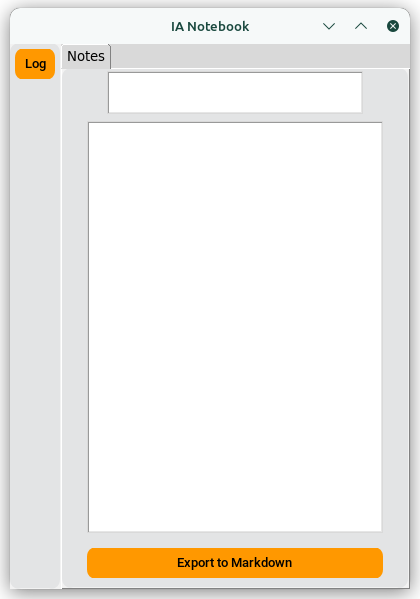
Hugging AI Notebook Alpha 001
Repo: https://github.com/AndreaKinder/HugChat-AI-Notebook
Introduction
This application is based on the functionality of Microsoft Copilot’s notepad, but for desktop use and with the ability to export the response in Markdown format, which the Copilot application does not allow.
Project Goal
To create a desktop application that uses the hugging face chat API to input a prompt and return a response, which can then be exported in Markdown format.
Requirements
Technologies
Programming language: Python
API’s
- CustomTkinter: https://customtkinter.tomschimansky.com/
- Tkinter: https://docs.python.org/es/3/library/tkinter.html
- hugging-chat-api: https://github.com/Soulter/hugging-chat-api
- asyncio: https://docs.python.org/es/3/library/asyncio.html
- json: https://docs.python.org/es/3/library/json.html
- os: https://docs.python.org/es/3.10/library/os.html
- datatime: https://docs.python.org/3/library/datetime.html
User Interface Design
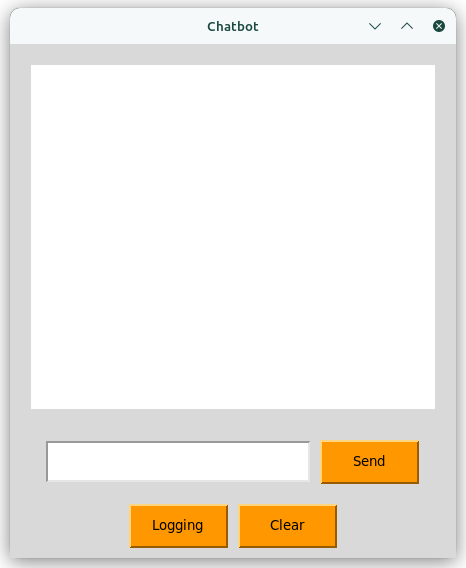
UI Colors
| Color Usage | Color Reference |
|---|---|
| Primary Color | d8d8d8 |
| Secondary Color (buttons, …) | fe9801 |
| Text Color | 000000 |
Summary of Alpha Functionality
Main Use
Call the hugging face chatbot to get an answer on any topic and export the answer in .md format.
Code
Data Storage Management
- capture_log: Saves the user’s credentials (username and password) in a JSON file (log.json) within a ‘storage’ folder.
def capture_log(us, passwd):
    data = {'us': us, 'passwd': passwd}
    if not os.path.exists(folder_name):
        os.makedirs(folder_name)
    with open(file_path, 'w') as file:
json.dump(data, file)- read_log: Attempts to read the user’s credentials from log.json. If the file is missing or corrupted, it triggers the creation of the login window (create_window_log).
def read_log():
    if not os.path.exists(file_path):
        create_window_log()
    else:
        try:
            with open(file_path, 'r') as log:
                log_data = json.load(log)
                return log_data['us'], log_data['passwd']
        except json.decoder.JSONDecodeError:
create_window_log()- import_chat_bot: Authenticates with the Hugging Face Chat service using the provided email and password. Handles loading or saving cookies for simplified login.
def import_chat_bot(email, passwd):
    EMAIL = email
    PASSWD = passwd
    cookie_path_dir = folder_name
    sign = Login(EMAIL, PASSWD)
    cookies = sign.login(cookie_dir_path=cookie_path_dir, save_cookies=True)
    chatbot = hugchat.ChatBot(cookies=cookies.get_dict())
return chatbot- generate_response: Obtains a response from the Hugging Face chatbot by first authenticating with the import_chat_bot function and then sending the user’s text query.
def generate_response(text, email, passwd):
    chatbot = import_chat_bot(email=email, passwd=passwd)
    query_result = chatbot.chat(text)
    return query_result
Import/Response Handling (Asynchronous)
- import_text_response(text): (Asynchronous) Obtains the chatbot’s response; used in the UI to generate responses without blocking.
async def import_text_response(text):
    email, passwd = read_log()
return generate_response(text=text, email=email, passwd=passwd)- check_directory(directorio): Checks whether a given directory exists.
def check_directory(directory):
    if os.path.isdir(directory):
        for filename in os.listdir(directory):
            if filename.endswith(".json"):
                return True
return False- check_file_true(): Prints a message indicating that a directory exists and contains a JSON file (probably for debugging).
def check_file_true():
print("The directory exists and contains a JSON file.")- check_file_false(): Prints a message indicating that a directory does not exist or does not contain a JSON file (probably for debugging). def check_file_true():
def check_file_false():
    print("The directory does not exist or does not contain a JSON file.")
- check_file_log(): Checks if the log file (log.json) is present. If not, it prompts for the login window (create_window_log).
def check_file_log():
    directory = os.path.dirname(file_path)  # Get directory path from file path
    if check_directory(directory):
        check_file_true()
        return True
    else:
        check_file_false()
        create_window_log()
        return False
GUI Components
- MyFrame
- This is the heart of your chatbot’s interface. Let’s see how its parts work together:
class MyFrame(ctk.CTkFrame):
    def __init__(self, master=master, **kwargs):

        self.my_entry = Entry(self)
        self.my_entry.grid(...)

        self.response_text = Text(self, wrap=WORD, height=25, width=35)
        self.response_text.grid(...)
        self.response_text.config(state="disabled")

        self.export_button = ctk.CTkButton(...)
        self.export_button.grid(...)

self.my_entry.bind('<Return>', lambda event: self.master.after(0, self.print_response_layout))- MyFrameTabs
- Manages the notebook-like tab structure. It primarily sets up a notebook widget and adds the initial “Notes” tab.
class MyFrameTabs:
    def __init__(self, master, **kwargs):
        self.generic_note = import_frame(master=master)
self.notebook.add(self.generic_note, text="Notes")- InputUs, InputPasswd, ButtonLog
- These are custom components for the login window. They likely handle the username, password input fields and a “Log In” button.
- App_Login
- Defines your login window. Its important functions likely include:
- logging: Would handle getting the username and password, potentially through the use of the capture_log function (which presumably saves login credentials).
- MylogButton, OptionsFrame
- MyLogButton: Triggers the creation of the login window (create_window_log).
- OptionsFrame: Seems to be a container for options, and it houses the login button.
Future implementations or improvements
Storing and exporting queries in Markdown format
Implement a storage system to save a record of all queries performed, along with the functionality to export each individual query to Markdown format.
Chatbot selection to have more precise responses
Select chat bot within the assistants published at https://huggingface.co/chat/assistants to obtain more precise answers on the topic or question to be discussed.
Translator tab implementation
With the Google Translate Python API a fast translator with automatic language detection will be implemented.
Native Android application
Thus the app will be implemented for mobile devices and desktop